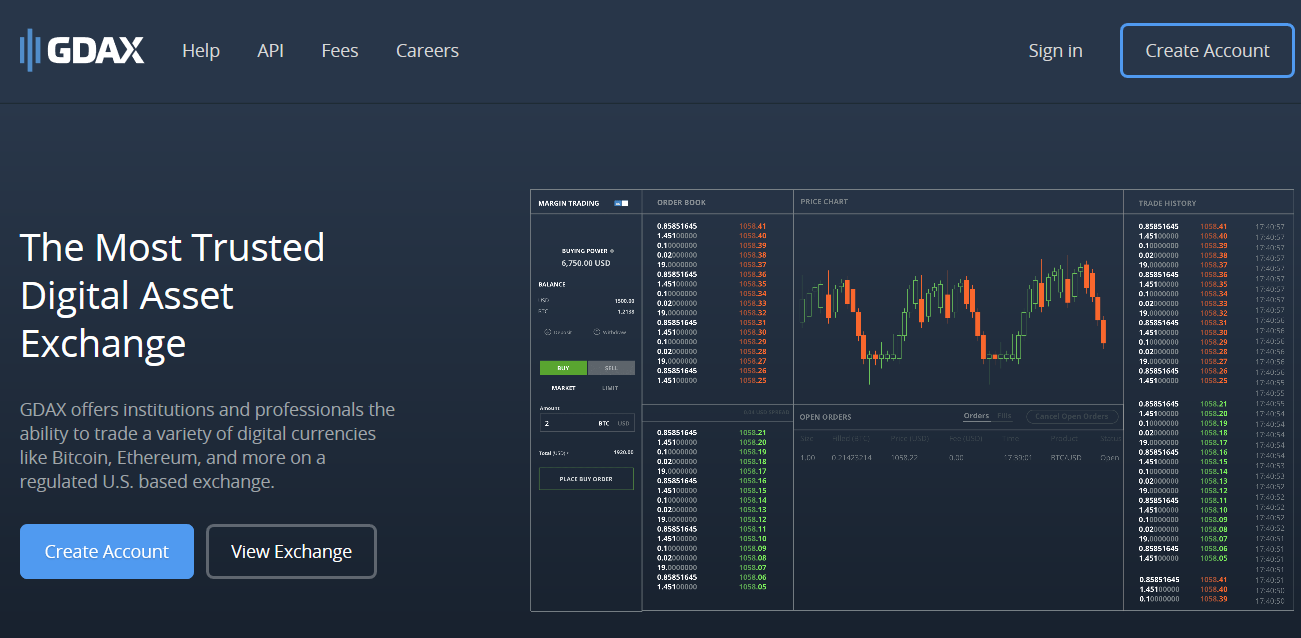
GDAX Review
Cryptocurrency

Is GDAX a Scam? – Review & My Experience

GDAX ReviewIf you are looking to buy or sell bitcoin, bitcoin cash, ethereum or litecoin online then GDAX is one of the options that you have. But I’m sure you have heard horror stories of investing in cryptocurrencies and using sites like this. Maybe you have heard about the notorious Mt Gox exchange that lost billions of dollars worth of bitcoins (at today’s value), or maybe you have heard of more recent exchanges getting hacked.

So is this a place you can trust? Or is GDAX a scam that you should avoid like the plague? I’ll give you a spoiler alert right now and tell you that GDAX is legit and I have been using them for quite some time. In this review I’ll be going over why they are one of the better and more trusted exchanges out there, their insurance policy, fees and more.

GDAX Review

The fact that GDAX is a regulated US based exchange says a lot. I’m not saying that this necessarily means you can trust them right away but the fact of the matter is that in the US they are subject to much more laws and regulation than many of the other exchanges operating across the globe. This means there is more customer protection.

GDAX is actually run by Coinbase, which comes out of San Francisco. They have been around since 2012 and have grown to probably (in my opinion) be the most trusted exchange there is. Many people use Coinbase as a way to first get started in cryptocurrency. They go through them to buy their first bitcoin…. ethereum or litecoin.

Anyways.. you can read my Coinbase review here if you would like. And just to be clear… Coinbase.com & GDAX.com are 2 different places run by the same company. The major difference is that GDAX isn’t quite as user friendly and is designed more for professionals or institutional investors making large purchases. GDAX might be a bit more complicated but on the plus side they charge less fees, which is why I use them.

What is GDAX Exactly?

I’ll make it more clear what they are and what they offer here…

GDAX is a dollar (or EUR) to cryptocurrency exchange. What they do is match people that are looking to buy cryptocurrency up with people looking to sell it. So if you are wanting to buy crypto, which I assume you probably are, you will set a buy order for a certain price. If you buy at what is the current market price then your order will be filled instantly because there will be plenty of sellers selling at that price at the same time.

What makes GDAX so great is that you can easily buy with real USD (or EUR). This is actually not all that common in the cryptocurrency space. Most exchanges only exchange for USDT (tether), which is kind of like the cryptocurrency version of USD. But anyways.. .I won’t get into that. All you need to know is that GDAX makes it easy to buy or or sell cryptocurrency straight from your bank account.

GDAX vs Coinbase

As I said, GDAX is more for professional traders/investors. It is a little more complex but charges lesser fees. At GDAX you have access to the order book so that you can see the stream of bids/asks going through and you have access to a much more informative price charge with a couple technical analysis tools available.

Ex:
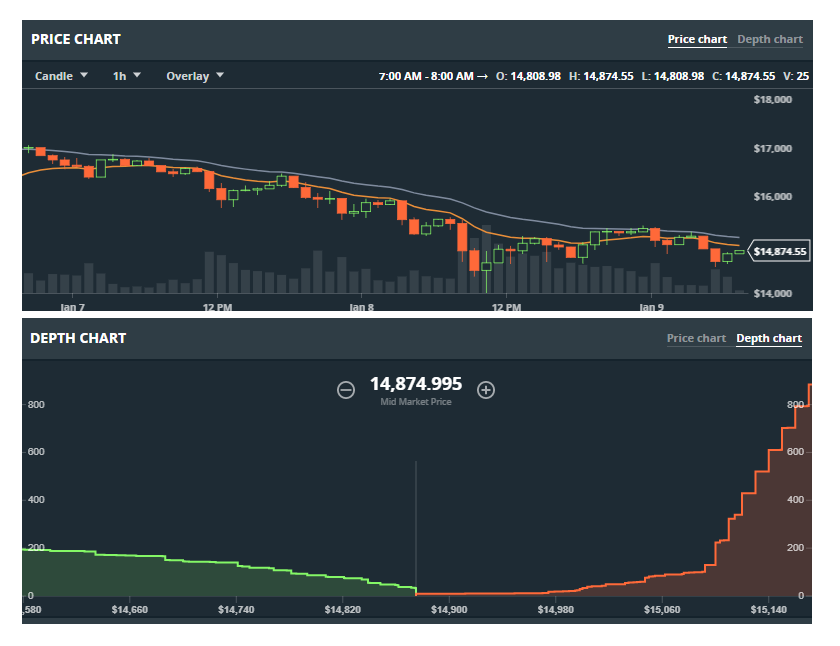
On the downside (other than being not quite as user friendly as Coinbase) GDAX doesn’t allow you to purchase cryptocurrencies with a credit/debit card like Coinbase does, which makes things extremely fast and simple.

Insurance Policy

I think its worth mentioning that GDAX does insure USD balances through the FDC up to $250,000, just like any normal bank does. This is a pretty big deal in my opinion and gives you some piece of mind.

The Fees

GDAX’s fees are pretty much nothing. They have what is called a Maker or Taker fee. And basically this is how it works: If you place an order (lets say below market price because you want a good deal) then your order will likely not be filled immediately, which means you made the order and are a Maker. But if you place an order and it gets filled immediately then you are a taker, because you got matched with an existing order (on the opposite side: buy vs sell) and took the order.

If you are a taker there is a 0% fee, which is awesome. And if you are a maker you will pay a fee of anywhere from 0.1 – 0.3% depending on the amount of volume that you trade, which I’m not going to get into.

The point here is that the fees are extremely low. You will be paying 0.3% at most. This is much less than Coinbase’s 1.49% fee for bank transfer buys and 3.99% fee for credit/debit card buys.

Buying/Selling On GDAX

Ok, so I’m going to use USD for buying/selling as an example.

When you are looking to buy bitcoin, ethereum, or whatever, with USD or you are looking to sell those cryptocurrencies back into USD, everything has to go through your GDAX USD wallet first.

So to buy, first you would have to deposit the money into your USD wallet within your GDAX account. This can be done through bank transfer, wire transfer, or your Coinbase account (if you have USD over there). And when you sell crypto’s back into USD it will end up in your USD account at GDAX, which you can then transfer to your bank account.

Setting Up an Account

To create a GDAX account you will need to create a Coinbase account since GDAX is run by Coinbase. Even if you go to GDAX.com and create an account you will be redirected to Coinbase.

So what I suggest is just going to Coinbase.com/join. Also, if you use my referral link Here you will be able to get $10 worth of bitcoin free and so will I.

Once you create a Coinbase account you will be able to login to GDAX with that account.

Conclusion on Everything – Should You Use GDAX?

GDAX is my go to exchange when buying into cryptocurrency with USD or when selling back into USD. It doesn’t get any better in my opinion because they are very trustworthy and have low fees. Of course in the world of cryptocurrency there is always some risk involve, such as potential hacking, etc… but GDAX seems to be very well managed and is a very professional trading environment.

I definitely do recommend GDAX. Coinbase I also recommend but mostly for newbies who aren’t looking to purchase all that much.. just because of the fees they have. If you are buying or selling large quantities to or from USD (or EUR) then GDAX is a great choice.

If you have any questions or comments be sure to leave them in the comment section below and I’ll get back to you soon 🙂

Read More
Crypterium
Cryptocurrency

Is Crypterium a Scam? – What You Should Know

CrypteriumCrypterium claims to be the future of banking and the JP Morgan of cryptobanks. But is all the hype surrounding it true? Or is Crypterium a scam like the many other opportunities that seem to be popping up all the time?

One things is for sure… in cryptoworld you can never be too careful with . Its very important to do a little research on the different opportunities that exist before getting involved. The goal here today is for me to help you with the process. In this review I’ll be going over what exactly Crypterium is, how it works, the tokens it offers & whether you should buy them, and the team behind it all.

Crypterium Review

Ok, so supposedly Crypterium is the JP Morgan of cryptobanks but what exactly does this mean? Well.. it doesn’t mean much. They are just making this claim to hype themselves up and basically say that they are the best.

The truth is that Crypterium is still very new. Its just starting out so we don’t really know how well it will perform. What I will say though is that they are set out to do big things and if they can deliver what they want to its going to be pretty great.

So What Does Crypterium Provide?

Crypterium offers a platform for lending where you can get anonymous loans, they offer a way to make contactless payments, but their “claim to fame” is their virtual Crypterium card (basically an app you can use on your smartphone), which is what most people will be using this for.

With Crypterium’s virtual card you are able to make payments in any cryptocurrency at over 42 million places (online and offline) around the world. You are able to use your virtual Crypterium card anywhere that accepts Visa, Mastercard, or Union Pay. Most people that hold cryptocurrencies are just holding them with the hopes of cashing them in for fiat money one day. Most cryptocurrencies you can’t really even use all that much…. but what if you could? That is where Crypterium comes in.

You are able to get use the Crypterium app on your phone to use your virtual card. They use NFC protocol with Apple Pay, Samsung Pay, and Android Pay.

Merchants will also be able to benefit from Cryperium. They will be able to accept payments in all cryptocurrencies and then have it exchanged for fiat currency at the lowest rate.

The Crypterium Tokens? Should You Go Out and Buy a Ton?

The tokens that Crypterium offers are what powers their platform. They are ERC-20 complaint which means that you can store them in Ethereum wallets such as MyEtherWallet, which is safe and convenient.

There are different ways that they can be used such as for getting loans through the loan services that they offer. However, many people will probably just hold onto tokens because you can use them as “gas” and get rewarded in CRPT  from the user transactions that occur on a monthly basis.

So should you invest? This is something that you will have to answer. I think this could really grow and if this happens then tokens are going to go up in value, which is what every investor wants.

A Look at The Team Behind Crypterium

Its always important to take a look at the people behind projects like this to make sure its legit or not. As far as Crypterium goes, they have a decent sized team, all of which you can look at and view profiles for on Linkedin. They have people with experience in cryptos, experience in FinTech, and other areas but there is no one that really stands out and has an amazing track record.

But of course just because there are no stellar members on the team doesn’t discredit what they are doing. After all, Bitcoin’s founder is someone (or group of people) that we still don’t know the identity of.

So I don’t really know what to think here. There are so many scams out there and its hard to trust places.

The Future of Crypterium

Of course only time will tell how successful this becomes but as far as I see it they are set out to do big things and this could become a massive business.

They are focused on providing a very much needed service that the everyday crypto holder can make good use of as well as merchants. Just think about it? You could go shopping and use your phone to pay for something with any cryptocurrency that you may have… and merchants will be able to accept any cryptocurrency and have it automatically exchanged for fiat money.

Conclusion

I’m not going to tell you to invest or give you any sort of advice like this but I will say that I don’t think this is a scam.

I know you have to be careful with all the cryptoscams like EthConnect & Crypto Money Maker going around, but this doesn’t seem like one.

I really hope that things do go as good as they seem they could. It will be nice to be able to use cryptos easier, which will also bring a lot more newcomers into the crypto space.

However, I’m hesitant to invest in this. I do think its over-hyped for how early on it is and I don’t trust the team behind it 100%.

Anyways… that’s it for this short review. I hope you enjoyed and if you have any comments or questions be sure to leave them below…

Also, if you are just looking into this for the investment opportunity then you might also be interested in this program which I use to make a living online.

Read More
Cryptocurrency

How to Buy Factom Coin (aka Factoids) – How I Do It

how to buy factomFactom is one of the projects out there that seems to have a bright future… and because of this Factoids (what “Factom coins” are called) may turn out to be a very good investment… which has you asking the question of how to buy Factom coin. In this short post I’ll go over not only how to buy it, but also how to store it and keep it safe if you are going to be keeping it for the long term.
There is a lot of good information out there on Factom, which is why I myself invested in the concurrency a while back. What the team behind this project is doing is truly good. Factom’s goal is to provide secure data storage on the blockchain…. which means safe record keeping. This is a big deal. Imagine having all your records… medical, financial, educational, etc, secured on a blockchain that will never get changed. I guess it could be bad if you don’t want people seeing your records… but overall its a good thing.

The cryptocurrency of Factom, which are called Factoids, are what allow people to enter data on the platform. They are used to secure the data by linking them to the Bitcoin blockchain. I really don’t know the specifics of how this all works but I do know it works and places are adopting this technology… and of course the more people that adopt it and use it means the higher the price of Factoids go.

But anyways… let me get to the point of this articles which will show you how to buy Factoids. These aren’t as easy to buy as Bitcoin, Ethereum, or Litecoin, but the process is still easy to go through. However, the first thing I want to go over is setting up your Factom wallet. This is important if to keep your Factoids safely stored.

Getting Your Factom Wallet Set Up

You can read everything you need to know about setting up your Factom wallet at docs.Factom.com but I’ll go over it briefly.

The first thing you will have to do is download the installer for the official Factom Enterprise wallet from Github. Then you will run the installer and the process of getting that installed is pretty straight forward.

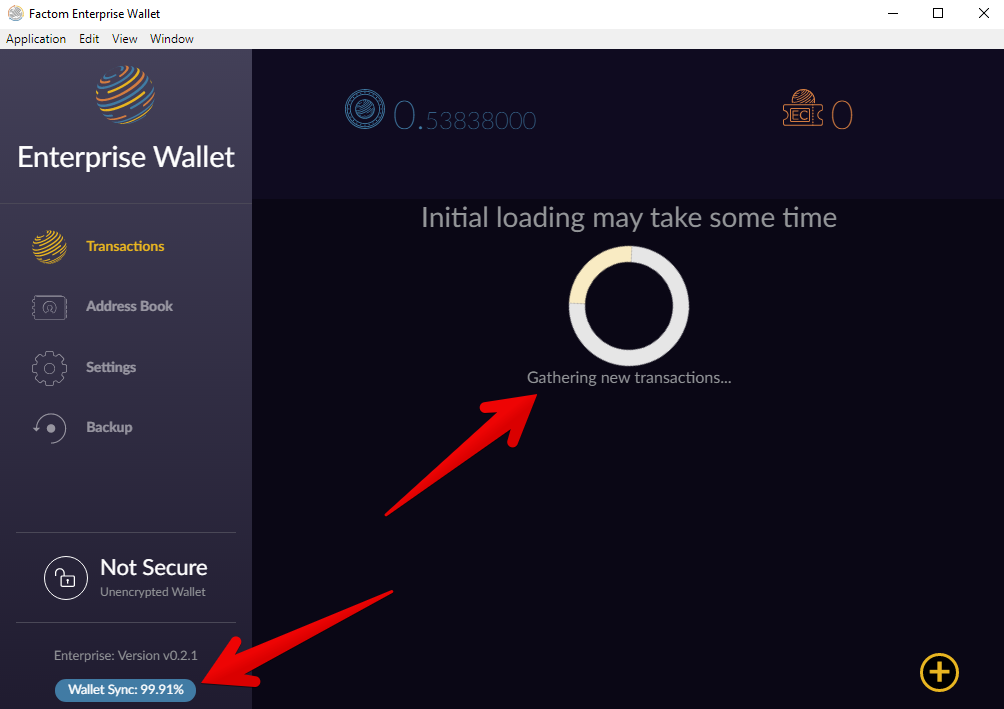
When you first open the wallet you will have the ability to choose a secure encrypted wallet or a not secure unencrypted wallet. Of course the better choice is to choose the secure one and set up a password for it. After going through this it will take a while to actually be usable. The reason is because it has to gather all the new transactions. This could take a while.

The wallet is pretty simple to use. Its basic but it does the job. You have your Address Book, Settings, Transactions… everything you need.

At the end of this when you go to send your newly bought Factoids to this wallet you will have to click on that + symbol at the bottom right which will allow you to send or receive.

But anyways… now onto the actual buying of Factoids. I suggest that you start getting your wallet set up and then you can start the process of buying Factoids as you are waiting on that to complete.

Buying Factoids

Step 1: You are Going to Need Bitcoin

Yes you will need bitcoin because we are then going to exchange this bitcoin for factoids. So if you have bitcoin you are good to go but if you don’t then you will need to buy some.

Where should you buy Bitcoin? The easiest and safest way to go about it is buying through Coinbase, which is a US based exchange that allows you to purchase bitcoin with your credit/debit card.

The first thing you will have to do is create a Coinbase account which doesn’t take all that long. You can go to Coinbase.com/join to do this.

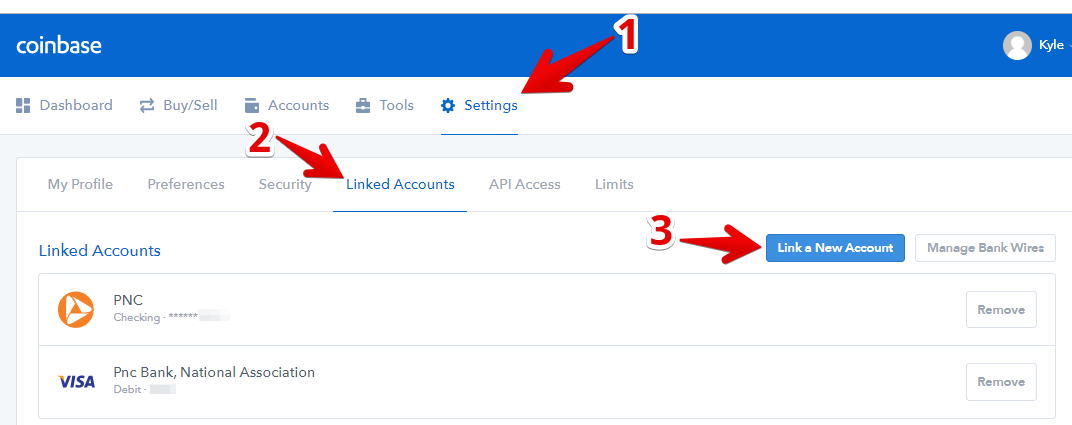
After that you will have to set up your payment method. To do this go into settings, click on linked accounts and click on link a new account. 

You can link a credit/debit card, a bank account, or you can even set up a wire transfer. Credit/debit cards are the quickest and will allow you to get bitcoin instantly but they also charge higher fees.

After you link an account you will have to go through a short verification process to show ownership over it.

Step 2: Buy Bitcoin

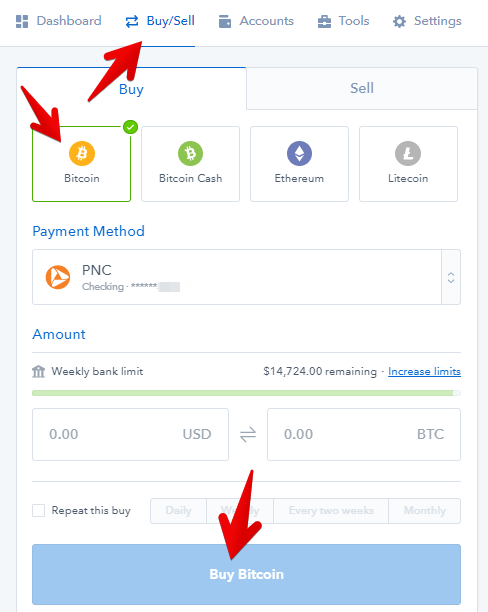
Now that you have your account ready you can purchase bitcoin. Go to buy/sell, click on Bitcoin and enter in how much you want to buy. 

Its pretty simple.

Step 3: Move Bitcoin to an Exchange

Now its time to move your bitcoin over to an exchange. But before you can do this you will have to open up another account on an exchange. I would recommend using Bittrex. There are lots of exchanges out there but Bittrex is a trustworthy one that does have Factom listed.

So you will have to go to Bittrex.com to do this.

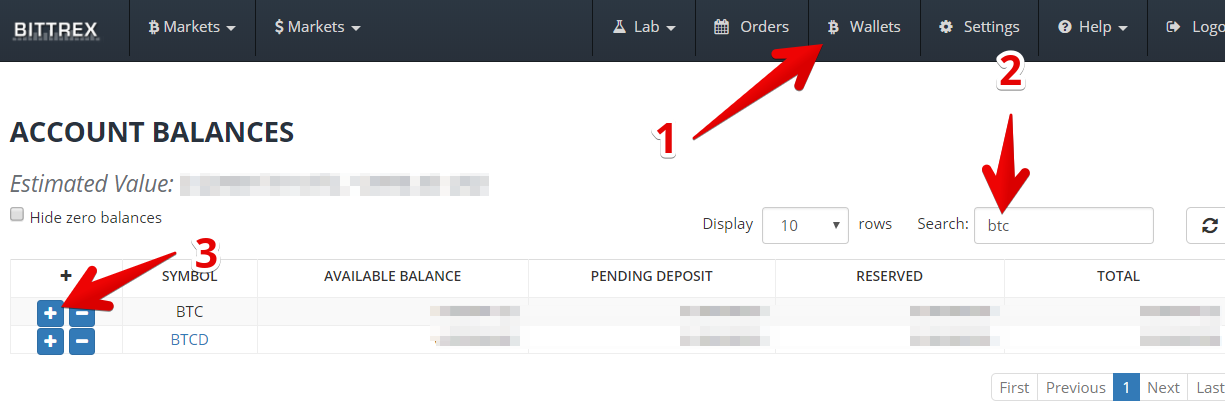
After that is all completed its time to deposit your bitcoin, which you will do by going into your wallets, finding your BTC wallet, and getting its address by clicking on the + symbol…

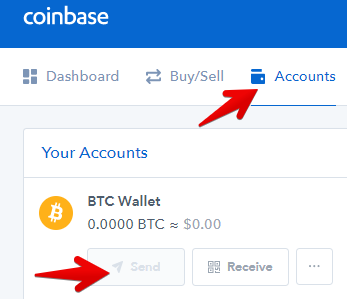
When you click the + symbol your wallet address will pop up which you can copy. Then you will have to head on over to Coinbase. At Coinbase you can send your bitcoin by going to Accounts and clicking on Send below your bitcoin wallet.

There will be a spot for you to enter in the address you just copied from Bittrex.

Step 4: Exchange Bitcoin for Factom

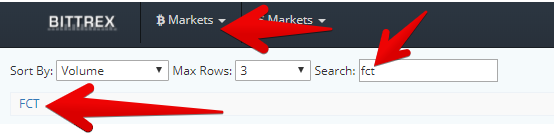
To do this you will first have to search for FCT (factom) in the bitcoin markets on Bittrex and click on the link that will take you to the trading page.

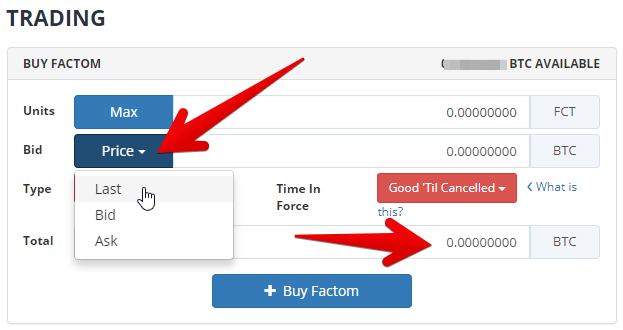
On the trading page you will have to scroll down a bit until you see this area to buy Factom. What you are going to want to do is first set a price that you are going to pay. Its a ration or FCT/BTC. I suggest choosing “Last” because it will just automatically set the price right at where its trading at that point in time, which means your order will get filled right away.

Then below that at the bottom you will enter in the total amount of BTC you are going to spend. The amount of FCT you will get at the top will be filled automatically…

Sending Your Factom to Your Wallet

Now its time to store those Factoids away in your wallet for safe keeping. To do this you will click on the + symbol down in the bottom right corner of the wallet, was I mentioned at the beginning of this post. You will them be able to click on Receive and it will give you your wallet address that you can send the Factoids to.

So now you will have to go to your FCT wallet in Bittrex, just as you did going to your BTC wallet a little bit ago. Just this time click on the – symbol, which will allow you to send your funds to another destination, in this case send your factoids to your wallet. Just paste in your wallet address, enter how much you want to send and you are good to go.

I would advise sending a very small amount for the first transaction just to make sure everything goes through. You will have to likely wait a bit for the factom to end up in your wallet even if everything is working properly.

Summary of Everything

  1. Set Up Your Factom Enterprise Wallet
  2. Buy Bitcoins from Coinbase if you haven’t got any (you can use my referral link here Coinbase.com/join to get $10 of BTC free in your account)
  3.  Move bitcoin to Bittrex & exchange it for Factom
  4. Move Factom to wallet

If you have any questions or comments about this process let me know in the comment section below. I’ll get back to you soon on anything.

Read More
Coinigy
Cryptocurrency

Coinigy Review – Read Before Buying

CoinigyCoinigy is a cryptocurrency trading platform that you can use to make trading a bit more easy and organized for yourself. But is it worth the price? And what are the upsides/downsides to it? These are all questions that need answered before you go out and decided whether or not you should use it.

In this Coinigy review I’ll be going over all that you need to know (well all that I think you need to know). I’ll be going over how it all works, whats nice about it, some of the problems it has and more.

Coinigy Review

As stated, Coinigy is a crypto trading platform. However, don’t get this confused with a trading exchange itself… like Bitrrex or Binance. When you trade on Coinigy you aren’t actually trading on Coinigy… I know this sounds strange but it isn’t. You see Coinigy is just a trading platform that you can hook up to your trading accounts at exchanges like Bittrex, Binance, HitBTC, Kraken, etc.

Its nice because you can trade from all of your exchange accounts right on one platform. This makes it easier to keep things organized and besides this there are some other upsides to using this platform, which I will go over first.

What’s Nice

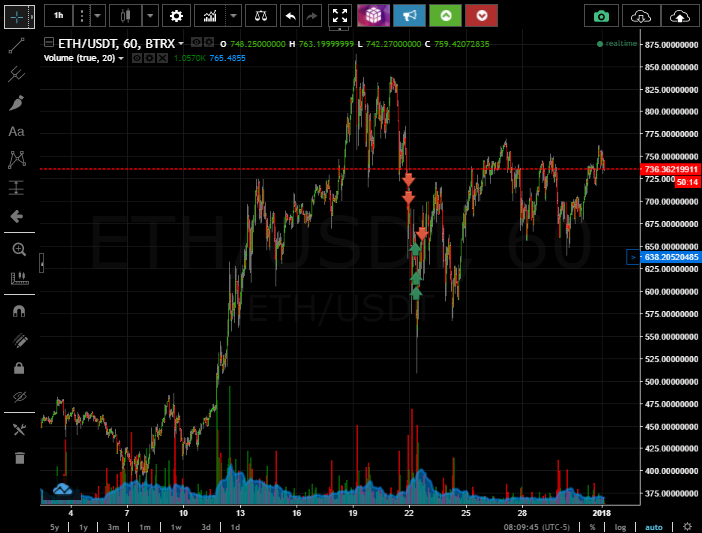
Coinigy uses your standard price charts that you will see for any sort of financial trading… 

And when it comes to charts Coinigy is as good as it gets. You can do just about anything you can think of with this chart. You can choose any candle size from 1 minute to 1 month, you can put the entire chart in line format if you don’t like candles, you can zoom in, you can zoom out, you can lengthen/shorten the price range on the y-axis… you can do all sorts of things.

They have just about every indicator out there that you can use to help predict whats going to happen in the market. If you are looking to use Bollinger Bands, RSI, Moving Averages, MACD, etc… they have it. Right now they have close to 100 different indicators that you can use.

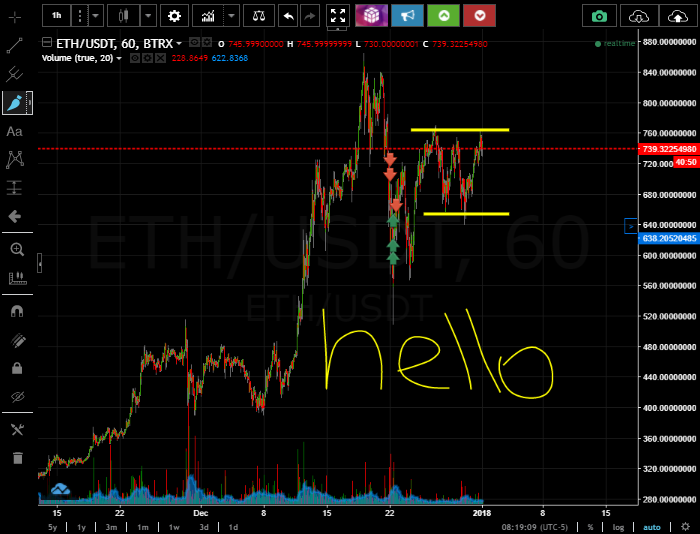
You can also draw directly on the charts which gives you somewhat of an advantage. You can go through drawing things and they will stay on the chart even when you leave to view another chart or something like that. This can help you remember things that you might want to take a second look at later, .. things like this. You can also easily erase drawings if you are finished with them.

Whats also nice about the visuals they give you is that you can see your buys/sells right on the chart. If you look above you can see red and green arrows… these are buys (green) and sells (red) on a trade a made with Ethereum. This is a lot easier than looking at a bunch of numbers and trying to figure everything out.

And besides the charts you can also look at the order book right there on Coinigy to try to predict where the price might go.

Alerts, Buys/Sells

Coinigy makes alerts easy. You can set alerts anywhere on the chart. You can drag your alert to any price point and you will be notified when it goes below or above it. You can choose to receive alerts via text and/or email which is nice and convenient.

The buys/sells are similar. You can drag them around the chart to anywhere, or you can just type in the exact price. You will also receive alerts when a buy/sell goes through. You also have the ability to place stop limits if the exchange you are trading through allows it. This way you can place a trade, go to sleep, and not worry about losing tons of money.

Organization

As I said earlier, you can connect a bunch of different exchange accounts to Coinigy and trade all from here. Not every exchange works with it but many do and allow you to hook them up through API keys.

Support

I almost forgot to talk about the support. Coinigy offers great support and this is something that you probably wouldn’t expect. Most newer age companies offer horrible support and its like you have to figure out everything for yourself.

Coinigy is great. You can submit a ticket about any problem to them and they get back to you pretty quick (I’d say no longer than a couple days at most, usually much faster).

You Can Go to Coinigy.com To Start a Free Trial

The Downsides

Coinigy is great but its not perfect. They do have a fair share of problems, most of which I think will hopefully be worked out as time goes on.

Not Every Exchange Is Supported

You can look at the different charts on just about every exchange but not every exchange allows you to trade through Coinigy. This can be a pain. I know they are still working on getting full functionality trading with more and more exchanges so this will be interesting to see where this ends up.

Buys/Sells Not Showing Up

There are times when Coinigy is a big laggy. Sometimes you will place buys/sells through Coinigy, they will go through, yet they will not show up as having went through on Coinigy. So what I have to do sometimes is go to the actual exchange, Bittrex for example, and check on my buy/sell. Then come on back over to Coinigy and refresh the page (which sometimes works).

Going along with this sometimes the buy/sell arrows will not appear on the charts, which is also annoying.

This is all bad, annoying, and a pain… but I’m honestly now worried about it. Coinigy is making updates all the time and a small technical issue like this is nothing. I have seen improvements on certain things like this recently too which is nice.

Worth The Price?

Honestly I think it is worth the price if you are a seasoned veteran trader or new to it all. I actually started with Coinigy when I just started trading crypos and I think it makes the whole process a bit easier. Sure there are some downsides to it that I just went over, but I only see this platform getting better as time goes on. And even with these little problems I would still say its worth the price.

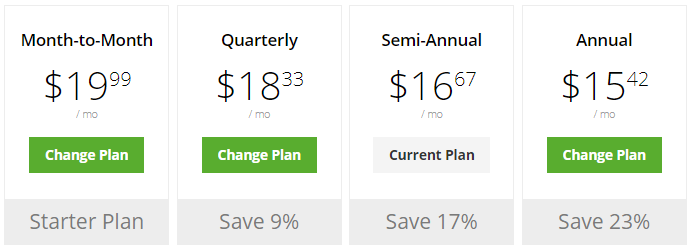
Right now the price ranges anywhere from $19.99/mo to $15.42/mo depending on how often you choose to pay…

And here is a list they give you of everything you are getting…

They are also offering a free trial right now that you can sign up for here. I’m not sure if this is something they will always offer or not.

If you have any questions about anything let me know in the comment section below. I’ll get back to you soon. There is a lot that I couldn’t cover here.

Read More
Crypto Money Maker
"Get Rich Quick", Cryptocurrency, Easy Money Scams

Crypto Money Maker Review – Another Scam or Good Opportunity?

Crypto Money MakerCrypto Money Maker claims to be able to make people at least $500 per day by trading on the cryptocurrency market. But can you really trust what you hear about this? After all there are plenty of scams out there that are popping up all the time with all the hype surrounding cryptocurrency.
So is Crypto Money Maker a scam like the many others? If you are wondering this then you are in the right place. I just looked into this system and in this review there are some things that everyone should know. And I’ll give you a spoiler alert right now: This place has scam written all over it!

Crypto Money Maker Review

Crypto MoneyMaker is supposedly a trading software that people are making $1,000’s per day with, which is a common sign of crypto scams. It is claimed to predict the market price of different cryptocurrencies and do everything for you.

Of course everyone is looking for a super easy way to make money online and this claims to be it. The spokesperson in the video that I watched, Jordon Wood, claims that the system does everything for you and all you have to do is click a few buttons to get started.

An automated system that dumps tons of money into your bank account? Who wouldn’t like that right? Well…. don’t go buy it just yet… you will see why.

The Lies

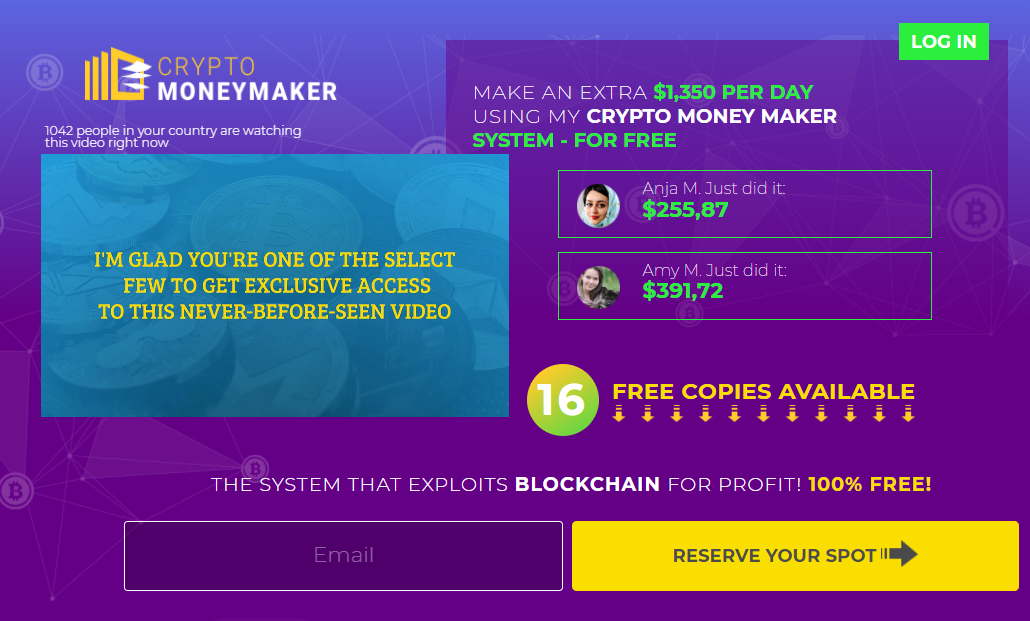
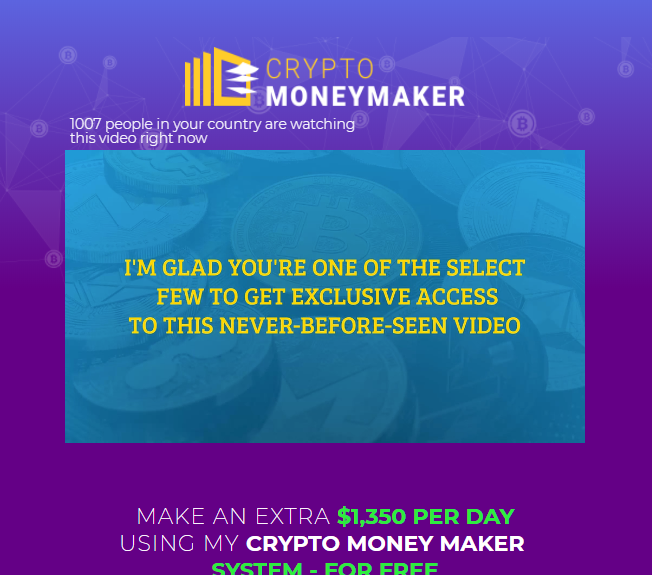
One of the first lies that you should know about is that you are NOT “one of the select few getting access to the video” on the sales page. That is what he tells you to make this seem exclusive but the truth is that anyone can go to cryptomoneymaker.biz and watch it.

He also tells you that you are guaranteed to make you more money this year than you have in the past 5 years. This is just a stupid claim that makes no sense. He has no idea what anyone watching the video has made in the past 5 years to begin with so its impossible for him to know this.

Another lie is that everything is free. Everything is NOT free and this is just another stupid lie. To begin trading you have to fund your account with $250 minimum, which is quite a bit of money.

Probable Lies

I couldn’t find any information on this “Jordon Wood” guy that is relevant to all of this. More than likely he doesn’t even exist. I see this all the time with scams. People are always making fictitious names to promote scams like this… its nothing new.

I also highly doubt that this software works anything like they say it does. Its is claimed that Crypto Money Maker was developed by some X-hacker, which there is no other information on.

Also, the way they tell you that it works isn’t making sense to me. First they tell you that it predicts token price based on market trends and analytics. Then they tell you that it is based on a secret loophole in blockchain trading.

These are 2 very different things so which is it? And besides this not making much sense neither claims are very plausible. I have seen dozens that make claims similar to this which have turned out to be complete scams.

The Reality Here

The reality here is that with all the hype surrounding cryptocurrency there are scams like this popping up on a daily basis. The fact of the matter is that you just can’t trust this place. I mean just think about it… why should you trust it?

They don’t give you any reason to trust them. There is no proof of anything they say actually being true. Anyone could have thrown together this scam just to make money. I review scams like this all the time. Some other recent cryptocurrency scams include Crypto Robo & Crypto Genius.

Conclusion on Crypto Money Maker – Scam?

Well I have not actually tried out this software but I’m about 99% positive its a scam. Everything about it fits the common scam description. It makes claims that you can make tons of money very fast…. it does everything for you…. they don’t tell you the names of the people behind it…. how it works makes no sense, etc.

You just cannot trust this place at all.

In the online world there are way more scam programs than legitimate ones so it can be difficult filtering out the scams and finding the right opportunities. One program that I will always recommend if you are looking to make money online is this program. I’ve been a members since 2015 and make a living working online now.

==> Program I recommend here

Questions or comments? Leave them below and I’ll get back to you soon ?

Read More
how to buy zcash
Cryptocurrency

How to Buy Zcash – The Easy Way to Do It

how to buy zcashMaybe you are looking to buy Zcash for investment purposes. Maybe you are looking to buy some to actually use it… whatever the reason, it doesn’t matter. In this short post I’ll be walking you through how to buy Zcash. Its a little bit more complicated of a process then buying bitcoin, ethereum, and litecoin, but its still pretty easy to do.

I’ll give you a brief summary of the process and how you can do this first: First you will have to buy bitcoin if you don’t already have some. Then you will transfer that bitcoin to an exchange. And lastly you will exchange the bitcoin for Zcash. Its a 3 step process that may sound hard but its nothing that anyone can’t do.

Step 1: Buy Bitcoin

There is more than one way to go about buying bitcoin but what I would suggest is buying through Coinbase. Coinbase is a US based exchange where you can buy bitcoin with a credit/debit card which makes things easy. They also have a good insurance policy in case something would happen which is nice.

To buy through Coinbase you will first have to create an account at Coinbase.com. After doing that you will want to go into the Settings and then go to Linked Accounts and click on Link a New Account

This is where you can link a credit/debit card or you can even link your bank account if you want to. You can also wire money over to Coinbase from your bank if you would like.

If you want to buy bitcoin instantly then you are going to want use a credit/debit card. The fees are less if you use your bank account but it will take a couple days, whereas using a credit/debit card you will have bitcoin instantly in your account.

Anyways… After getting your payment method set up and verifying it, you will be able to buy. So you will want to got to Buy/Sell and enter the amount of USD you want to spend of the amount of bitcoin you want to buy.

Step 2: Transfer Bitcoin to an Exchange

There are a bunch of different cryptocurrency exchanges you can use here but I’ll be showing you with Bittrex, because they are what I use and they are one of the better and trusted exchanges out there.

So before you go any further you are going to have to create an account at Bittrex.com. I know this is a bit of a hassle but this is the last account you will have to create and its just part of the process.

After creating your account click on Wallets up in the top menu. Then search for BTC (which is the symbol for bitcoin) in the search box. Then click on the + symbol to the left…

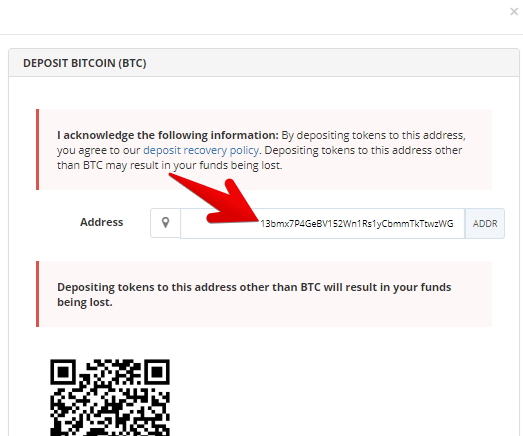
When you click on that + symbol a box will pop up with your public bitcoin wallet address as you can see here… 

You are going to want to copy that address and then you will have to head back on over to Coinbase. Now you need to go into Accounts and click on Send under your bitcoin account. Once you do this another box will pop up and you will be able to enter the address you just copied from Bittrex as the destination address for where to send the bitcoin.

Make sure that you enter the address correctly because if you mess it up your bitcoins will be lost and there is no way to recover them.

Step 3: Exchange Bitcoin for Zcash

Ok so now you are at the final step. You now have sent your bitcoin over to Bittrex and are ready to exchange them for Zcash. The transaction may take a bit of time to go through so don’t panic if it hasn’t yet. Just wait.

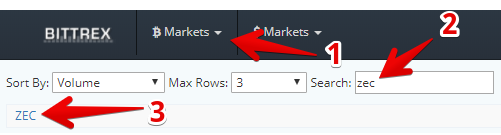
Once it is in your wallet Bittrex go to bitcoin markets, search for ZEC (which is the symbol for Zcash) and click on the link.

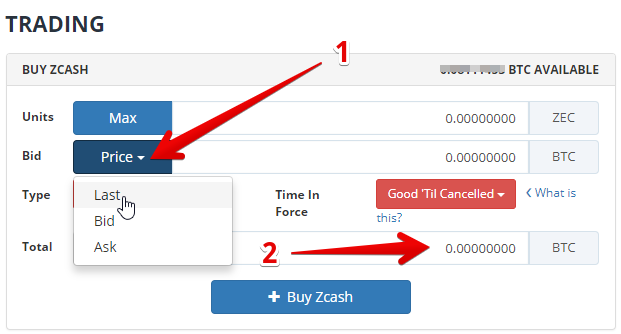
This will take you to the page where the trading goes on. Scroll down until you see the trading section and the part you are interested in is the Buying Zcash side…

The first thing to do is enter the price that you are going to be buying Zcash for. You are going to want to set a price that is what Zcash is currently trading at. What you are doing here is buying from someone that is selling. All exchanges really do is match buyers with sellers.

What I suggest is to choose “Last” price and it will automatically enter in the latest price that its trading at. This way when you place your order it will be filled quick.

Next you are going to want to enter the amount of BTC you want to spend in the Total box at the bottom. Once you do this the amount of ZEC (Zcash) will be filled in automatically. Then all you have to do is click on the buy button and wait for your order to go through.

Storing Your Zcash

You can keep your Zcash in your wallet at Bittrex if you want to but if you have a lot and are looking to hold onto it for a long time this isn’t something that is usually recommended. What you would want to do in this situation is store in your own cold wallet.

I’m not going to get into all of this because it would take a heck of a lot of time. But there is a good article on Zcash wallets here that you can read if you are going to be taking this route.

Summary of The Process

Ok so here is a summary of everything: First you need bitcoin which I suggest buying through Coinbase. And by the way.. if you use my referral link here www.coinbase.com/join to join you can get $10 worth of bitcoin free. Then transfer that bitcoin to Bittrex or another exchange and buy some god old Zcash.

And of course after that you can keep it there in your wallet at the exchange or send it off to another wallet.

If you have any questions about all of this be sure to let me know 🙂

Read More
how to buy vertcoin
Cryptocurrency

How to Buy Vertcoin – How I Do It In 3 Easy Steps

how to buy vertcoinVertcoin is one of the newer more promising cryptocurrencies out there that is set to take some of the market share away from the king, which is Bitcoin. There is a lot of optimism surrounding this crypto and for good reason, which is why I’m going over how to buy Vertcoin in the first place. I don’t really want to get too much into why I think Vertcoin is a good investment choice because that is not the purpose of this post, but I’ll give few of the reasons why I’m investing.

First off, Vertcoin offers decentralized mining. They make it way easier to mine the coins so that people with regular old computers can get a piece of the pie, rather with Bitcoin where you have to have to invest a heck of a lot of money to use ASIC technology. On top of this, I like how Vertcoin’s goal is nothing crazy. The developers behind this coin (which are also very good by the way) are not setting out to conquer the world. Vertcoin is a cryptocurrency and nothing more.

Anyway, those are some of the basic reasons I’m investing because I think this coin will be adopted by many in the future. But now let me get to how I buy some gold old Vertcoin and how you can too.

Step 1: Buy Bitcoin

What we are going to be doing here is buying bitcoin first, then exchanging it for Vertcoin. There is no place that I know of where you can just buy VTC initially, but anyway this isn’t hard at all to do anyhow.

If you already have bitcoin you are good to go but if you don’t you are going to want to open up a Coinbase account. Coinbase is probably the most trusted out there where you can easily buy bitcoin with credit/debit cards. They are based right here in the US, ran by professionals in the industry, and have a good insurance policy.

Once you have created your account the next step will be to hook up your method of payment. You can either choose to pay with a credit/debit card, link your bank account, or even do a wire transfer. The fees are slightly higher if you pay with a credit/debit card but the good thing about paying with one is that your bitcoin is available instantly in your account.

To link your account you will need to go to Settings  >> Linked Accounts >> Link a New Account… as you can see below…

After you link an account you will have to verify that account which is pretty straightforward. After doing all of htat you are then ready to buy some Bitcoin.

To buy Bitcoin you will go to the Buy/Sell menu link and click on Bitcoin. Then click on the payment method that you made and enter how much bitcoin you are looking to buy or how much USD you want to spend. Its as simple as that…

Step 2: Transfer Bitcoin to an Exchange

Ok, now you have your bitcoin and need to exchange it for Vertcoin. So you need to transfer it to an exchange that lists Vertcoin. The reason you can’t just buy Vertcoin initially from these exchanges is because they don’t give you the option to.

Anyway… I use the Bittrex exchange because, again, they are one of the more trustworthy exchanges out there and I have been using them for a while. So you will first have to create an account at Bittrex.com.

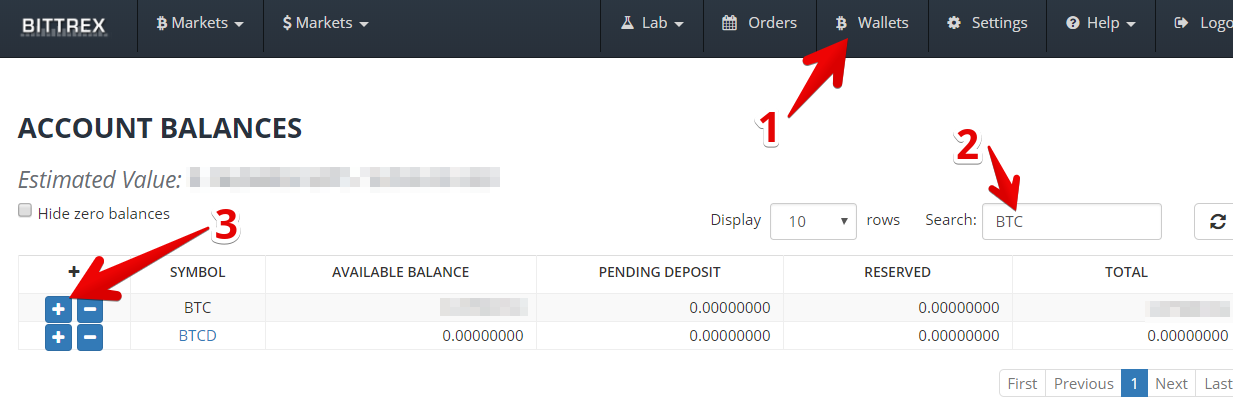
After creating your account you will need to go into Wallets in the upper menu. Then search for BTC, which is the symbol for Bitcoin. Then click on the + symbol beside this which will give you your public wallet address so that you can deposit the Bitcoin at Bittrex.

When you click on + symbol a little box will pop up with your bitcoin address. Copy that address and then you will have to head back on over to Coinbase.

When you are at Coinbase click on Accounts and then on Send underneath your BTC wallet. As you can see I don’t have any Bitcoin in my account at this time but you will be able to click on it.

After clicking on send a box will pop up where you can enter the recipient address, which is the address you just copied from Bittrex. So paste that in there, then enter the amount you want to send and that’s it. Be sure to double check the address you paste in because if you send it to the wrong address there is no way to get your bitcoin back.

Step 3: Exchange Bitcoin for Vertcoin

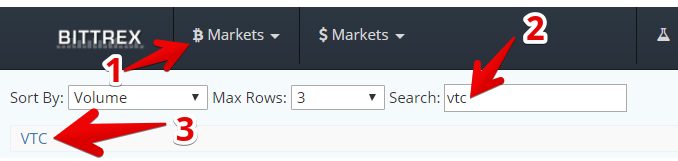
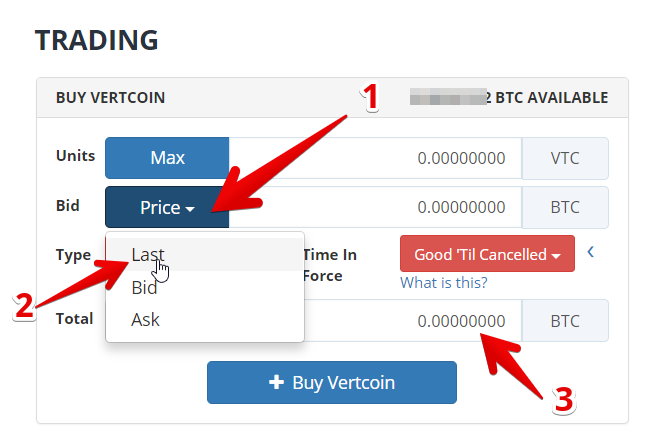
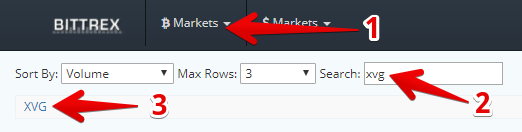
So at this point you have your Bitcoin over in your Bittrex account and are ready to exchange it for Vertcoin. To do this you will first have to click on the Bitcoin markets tab in the top menu, then search for VTC, then click on the VTC link…

This will take you to the 

How to Store Your Vertcoin

Its always the best idea to store your Vertcoin in a wallet off of an exchange, especially if you have a lot invested in it and are planning on holding it for a long time. You can keep it at Bittrex in your wallet they provide, I’m not saying that its a bad idea… but exchanges do get hacked every once in a while so its better to play it safe in the long run.

*I have never had any problems at Bittrex by the way.

You can go to Vertcoin.org to download wallet that the developers provide or another good option is the Electrum Vertcoin wallet, which seems to be a favorite for many vertcoin holders.

Summary of Everything

Just to summarize: First you need some bitcoin which I suggest buying through Coinbase. And by the way if you use my referral link to join right here: www.coinbase.com/joinyou can get $10 worth of bitcoin in your account for free. Then you need to send your bitcoin to an exchange which you will then trade for Vertcoin.

If you have any questions about all of this be sure to ask me below. I’ll get back to you soon 🙂

Read More
how to buy verge
Cryptocurrency

How to Buy Verge – Step by Step

how to buy vergeVerge (XVG) is one of the privacy coins out there that seems to have a bright future. The people want a currency where anonymous and completely untraceable transactions can be sent and with Verge you can do this. Its very similar to Monero in many ways but one way that Verge is better, as many would argue, is that it uses “blackhole” technology which basically means that your IP address isn’t able to be seen in transactions.

So anyway…. Verge is a coin that I am interested in and I know a lot of others are as well, which is why I’ll be going over how to buy Verge in this short post. And by the way… there are several ways you can go about doing this. I’ll be going over how I do it and what I think is easiest/ safest. And just to summarize this, what you will be doing is buying bitcoin, transferring it to an exchange, and then trading it for Verge.

Step 1 – Create Coinbase Account

The first step is to buy bitcoin which I suggest using Coinbase for. Why do I suggest using Coinbase? Well because they are based in the United States, they have a good insurance policy, they make it easy to purchase bitcoin, and I have been using them for a while and have had no problems.

You can create your account by going to www.coinbase.com/join 

Step 2 – Buy Bitcoin

Now that you have your Coinbase account open the next thing you have to do is set up your payment method so that you can buy the bitcoin. To do this go into Settings > Linked Accounts > Link a New Account. Here you will be able to link your credit/debit card or a bank account. You can also pay for bitcoin with a wire transfer if you would like.

When you link an account you will have to verify it. Then you will be able to purchase. So to purchase go to Buy/Sell in the upper menu, click on Bitcoin, make sure you have your payment method selected, and enter the BTC that you want to buy or the USD you want to spend.

The process of buying bitcoin is very simple on Coinbase.

One thing to know is that if you use your bank account or wire transfer it will take longer… the fees will be a bit lower but it takes longer. If you use a credit/debit card the fees are higher but you will get your bitcoin instantly upon purchase.

Step 3 – Create Bittrex Account

Now its time to open up an account with an exchange that sells Verge (XVG). There is more than one route you can take here but I use Bittrex, which is one of the best.

So to open an account go to Bittrex.com. The process is pretty straightforward so I’m not going to go over anything here.

Step 4 – Send Bitcoin to Bittrex

Now we want to send the bitcoin from Coinbase to Bittrex. First you will need to click on the Wallets menu link, search for BTC, and get your public wallet address so that you can send the bitcoin on over.

When you click on the + symbol beside BTC a box will pop up with your wallet address on it. You are going to want to copy this address (make sure you copy it exactly) and then head on over to Coinbase again.

Once back over at Coinbase go to Accounts and click on Send under your bitcoin account.

When you click on Send another box will pop up with a place that you will enter in the recipient address and how much bitcoin you want to send. Paste the address you just copied from Bittrex over here, double check it, and then send the bitcoin.

This might take a bit for the transaction to go though.

Step 5 – Exchange Bitcoin for Verge

Once you have your bitcoin in your wallet at Bittrex you can then trade it for Verge. So go up to Bitcoin Markets up at the top menu, search for XVG, and click on the link.

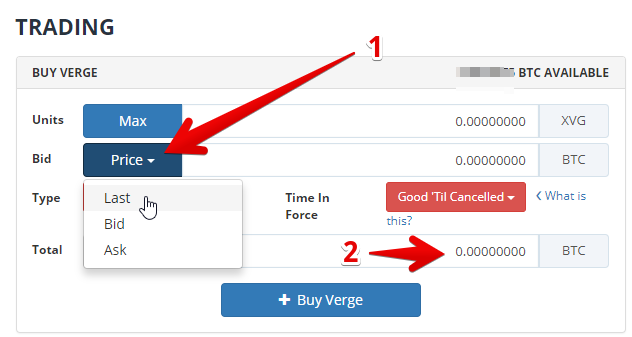
This will take you to a page that shows you a price chart for XVG and what you are going to want to do is scroll down until you see the trading section. The Buy Verge side of course is what you want to look at. What you will see is this below…

For the Price I suggest clicking on Last and then the current market price will automatically be entered in for you. If you do this your order will be filled right away. Then you can go down and enter the total bitcoin that you want to spend. When you do this the amount of XVG you are purchasing will be entered automatically.

After you click on buy your order will be placed in which a seller (or sellers) that are trading Verge will sell to you. Your Verge will then end up in your Bittrex wallet right away.

Keeping Your Verge Safely Stored

Its important to keep your Verge stored safely if you have a lot and are looking to hold onto it for a while. I’m not saying that you will lose your Verge if you keep it in your wallet at Bittrex, after all I have never lost any coin there, but I’m just saying it would be safer to store in a wallet such as the Electrum wallet that the developers provide.

You can go to their official website here to download this wallet.

Summary of Everything

Unfortunately there isn’t a more straightforward way to get your hands on Verge at this time. You first have to buy some bitcoin, which I recommend using Coinbase for (by the way if you use my referral link here www.coinbase.com/join to join you can get $10 of free bitcoin in your account). After you have your bitcoin it needs transferred to an exchange that supports XVG. I use Bittrex. Then trade your BTC for XVG and move your XVG into a safer wallet such as the Electrum wallet if you are going to be holding onto it for a while.

I know some of this might get confusing so if you have any questions just leave them below in the comment section and I’ll get back to you soon 🙂

Read More
CryptoWorld Network
Cryptocurrency, MLM's

CryptoWorld Network Review – Scam Program or Amazing Opportunity?

CryptoWorld NetworkSince you are looking into CryptoWorld Network wondering if its possibly a scam or now I’m guessing that someone sent you their referral link trying to get you to join. Maybe they sent an email, maybe it was in a Facebook post… whatever the case it doesn’t matter.

In this CryptoWorld Network review I’ll be going over what exactly this place is, what it provides, the cost, why there are people promoting it and more. And by the way I am in no way affiliated with this program so this is a completely unbiased review.

CryptoWorld Network Review

Crypto World Network is a networking platform that is based around cryptocurrency. The purpose of it is to give people a space, kind of like Facebook, where they can talk back and forth, share ideas and information, let people know about good investments, strategies, opportunities, etc.

There are different membership levels available within CryptoWorld Network and of course the more expensive membership you buy the more you get. With the higher priced ones you are able to create your own groups that others can join and you can even choose to charge people for joining if you would like.

This place is also a mlm (multi-level marketing) opportunity which means that you can sell these memberships to other people and also earn money when they sell to other people and so on.

What You Get

Well as I said, this place is based around networking. As a member you get to engage with other people who are in the crypto space and have paid to be a member, which I agree is actually a good thing because it eliminates people who aren’t serious at all.

On the platform there will be many different areas and focuses. You will be able to find education on the blockchain technology, information on making money with ICO’s, mining, altcoins, and plenty of other things.

As I mentioned earlier, members are able to create their own groups here so there is no telling what you will find. Joe could make a group that is dedicated to daytrading, where you would be able to stay up-to-date on different opportunities that arise.

There are different subscription levels that you can purchase including Networker, Pro, and VIP.

Networker – $49/yr

  • Most basic package
  • Gives access to the network

Pro – $499/yr

  • Get access to the pro network
  • Get ability to start your own group (Ex: can start a group around daytrading, pullback trading, long term investing, etc.)

VIP – $999/yr

  • Get access to the VIP network
  • Get to create your own business page on CryptoWorld Network. Which you can then promote to bring people in.

They also sell Adpacks for $49/mo which give you the ability to place ads on the site. Its kind of like Facebook in this way and the ads will be shown off to the side of the different pages on the site.

A word of warning though: You will likely find lots of scam advertisments with all the new crypto scams floating around.

Compensation Plan

As I said, this is also a mlm opportunity and you can make money promoting and selling the memberships.

They call their compensation plan InstaCrypt. I guess they call it this because you can earn bitcoin on a daily basis with it. But anyways… I’ll be going over some of the main features of this comp plan.

Binary Payouts

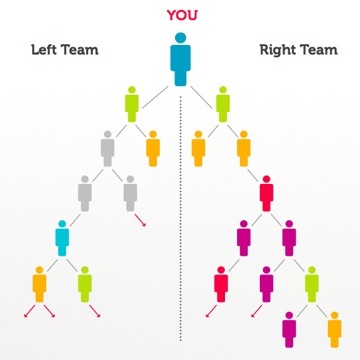
The binary payouts are at the core of the comp plan. With a binary structure like this you have 2 positions beneath each person. So below you there are 2 positions and then those branch out the further down you get. I put a diagram over to the right so you can see how this works.

Everyone has a left and a right team. And with the compensation plan here you will get paid between 10-20% of the sales volume on the weaker team.

The amount you get paid ranges depending on the amount of sales that you make. And remember… these sales that I’m talking about are the memberships for CryptoWorld Network.

Matching Bonus

You will also be able to earn a 50% matching bonus that goes down to 5 generations deep.

So you will get paid off of people making money selling CryptoWorld Network subscriptions that were recruited in below you (gen 1), and people making money that were recruited in below them (gen 2) and so on.

One Thing to Be Aware Of

One thing that I think it is important to mention is that there are going to be a lot of people promoting CryptoWorld Network just to make money with the compensation plan. This is one of the problems with this business model.

It would be great if everyone that joined were joining because they love cryptocurrencies and are interested in learning but the reality is that this is not how it will work out. Because of the pyramid-like mlm business model that this has it is going to attract people that are just looking to make money recruiting in others to join.

Conclusion on CryptoWorld Network – Good Opportunity or Scam?

Well I do not think that CryptoWorld Network is a scam like The Crypto Genius & BTC Global Team…. but I also will not be joining at this time. I will wait and see how this business grows in the future. The reason I will not be joining is because I see a lot of potential for this business to go downhill.

There is potential for this to turn into just another big promotion site instead of being a site that provides good quality information and training on cryptocurrencies. Like I said… I know there are already a fair number of people out there promoting this opportunity yet they don’t really use it in the way they promote it.

Anyways… If you have experience with this place I would appreciate you leaving a short review in the comment section below.

And if you are looking for a program that I recommend for making money online then it doesn’t get any better than this program. I have been a member since 2015 and make a living online now…. which goes to show that it actually works.

==> Recommended Program Here

And also if you have any questions or comments be sure to leave them in the comment section below as well.

Read More
Cryptocurrency

How to Buy NEO (Cryptocurrency) – The Easy Way

how to buy NEONEO is really catching on more and more in the market and the price is reflecting this gain in popularity by going up. So its no wonder that you are looking to buy some. In this short post I’ll be going over how to buy NEO the easy way. This is how I buy NEO and this is how I recommend other buy it. Its safe, easy, and you will have your NEO shortly.

I’m guessing at this point you have already done your research on NEO and are looking to buy it for good reason. Personally I think its a great investment but I still always recommend that everyone do some of their own research before getting involved.

But anyway… lets get to it…. how to buy…

Step 1: Get Bitcoins

I know this may sound weird but you will need bitcoins first. After buying these bitcoins I will show you how to exchange them for NEO. Its not the most straightforward process out there but its the easiest way to go about it at this point.

So if you have bitcoins already then you can go to step 2, but if not I’ll show you how to get some.

I always recommend buying bitcoin at Coinbase. Why? Well because they are based in the US, they have a professional staff with a good reputation, and I have been using them for quite a while and know they can be trusted. Oh and also they have a good insurance policy in case of getting hacked or something like that.

The first thing you will have to do is create a Coinbase account. If you use my referral link here www.coinbase.com/join you will be able to get $10 in your account for free.

Setting up your account is pretty easy so I won’t go into detail here.

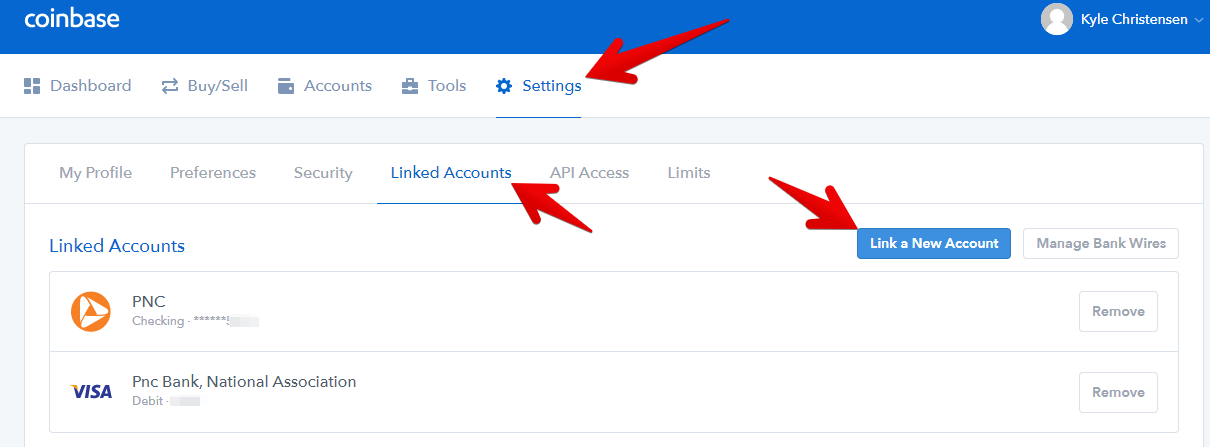
The next step would be to add a method of payment, which is what you will use to buy the bitcoin. To do this you will have to go into Settings > Linked Accounts > Link a New Account.  Then you will be able to add either a credit/debit card or link your bank account. Debit/credit card transactions are much faster and happen instantly which bank transfers take longer. 

Coinbase is very safe and you will have to go through the verification process in order to use your payment method. Once you have done that you can then go to Buy/Sell, click on Bitcoin, choose your payment method, enter the amount you want to buy and click buy…

If you used a credit/debit card you will have your bitcoin right away, if not it will take longer.

Step 2: Transfer Bitcoins to Exchange

Now you are going to want to transfer your bitcoins over to an exchange. First of course you will have to open up an account at one of these exchanges.

I recommend using Bittrex. They are another trusted company and I use them more than any other. So you will have to go to Bittrex.com to do this.

After opening your account and going through the verification process and all of that you then need to go to Wallets and go to your BTC wallet, which you will automatically have. Then click on the + sign of your BTC wallet.

After clicking on that + sign, you will get your wallet address where you can send your bitcoin to from Coinbase.

You will have to copy that address, which will be a series of numbers and letters, and then head on back over to Coinbase. You are going to want to click on Accounts, find your bitcoin account and click on the Send button. In my example I don’t have any bitcoin to send but you will be able to click on that.

After clicking on it it will give you an area where you can paste in the destination address that you just copied from Bittrex and you are good to go. Just enter the amount you want to send and click to send.

Step 3: Exchange Bitcoins for NEO

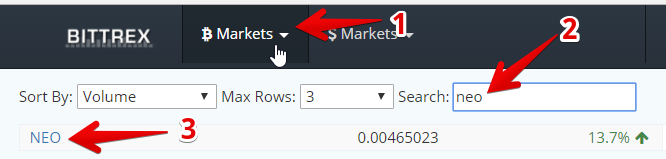
Ok so after that transfers on over to your Bittrex account you then are ready to exchange it for NEO. To do this go to bitcoin markets at the top and search for NEO, then click on it. This will take you to the trading page. 

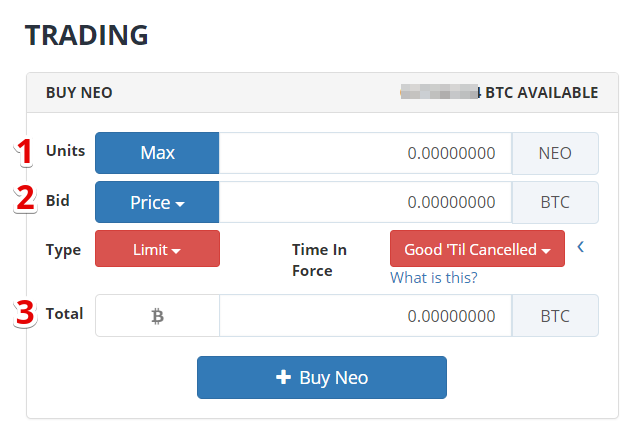
Then once you get to the page scroll down and you will see the Buy NEO area…

As you can see I have labeled 1, 2, and 3 to make it easier to understand.

The units (#1) are the amount of NEO that you are going to buy. You can choose to enter that in or you can enter in the bitcoin you are willing to spend later. So you could leave this Units area blank if you would like.

The Bid (#1) is the ration or NEO/BTC that you are willing to pay. Its the price of NEO/BTC. If you click on Price there will be a dropdown and I would suggest choosing “Latest”. This will give you the current bid price that NEO is being sold at. You could choose lower than this but then your order might never get filled. If you choose the latest price someone is going to sell to you right away.

What you have to remember is that an exchange like this just matches sellers up with buyers. So you are buying from someone that is trying to sell. Of course buyers want to buy low and sellers want to sell high. The price in the middle is where these both meet and that is the current or “Latest” price.

The Total (#3) is the total amount of bitcoin you want to exchange for NEO. If you enter this and you already entered the Bid price then the amount of NEO you will get will be automatically calculated.

Then all you have to do is click on buy NEO and your order will be filled. Simple as that.

What to Do Now

Now you have your own NEO. If you are going to be holding onto it for a long time I would seriously look into getting a cold wallet to store it. This way it isn’t able to be hacked. I especially suggest this if you just bought large amounts.

There are different ways you can go about doing this but I’m not going to get into that here.

Summary of The Process

Ok…. so first you need bitcoin. If you don’t have any then go to Coinbase and buy some with your debit/credit card or your bank account. Use my referral link here www.coinbase.com/join if you want free $10 of bitcoin in your account. Then transfer your bitcoin over to Bittrex and exchange it for NEO. Simple as that!

If you have any questions or comments be sure to let me know in the comment section below. I’ll get back to you soon 🙂

Read More